WhatsApp AI agent or chatbot: which one to choose
WhatsApp AI agent, menu chatbot or the built-in AI in WhatsApp Business: what each does, the effort it takes and which fits your SMB. Decide in 6 steps.
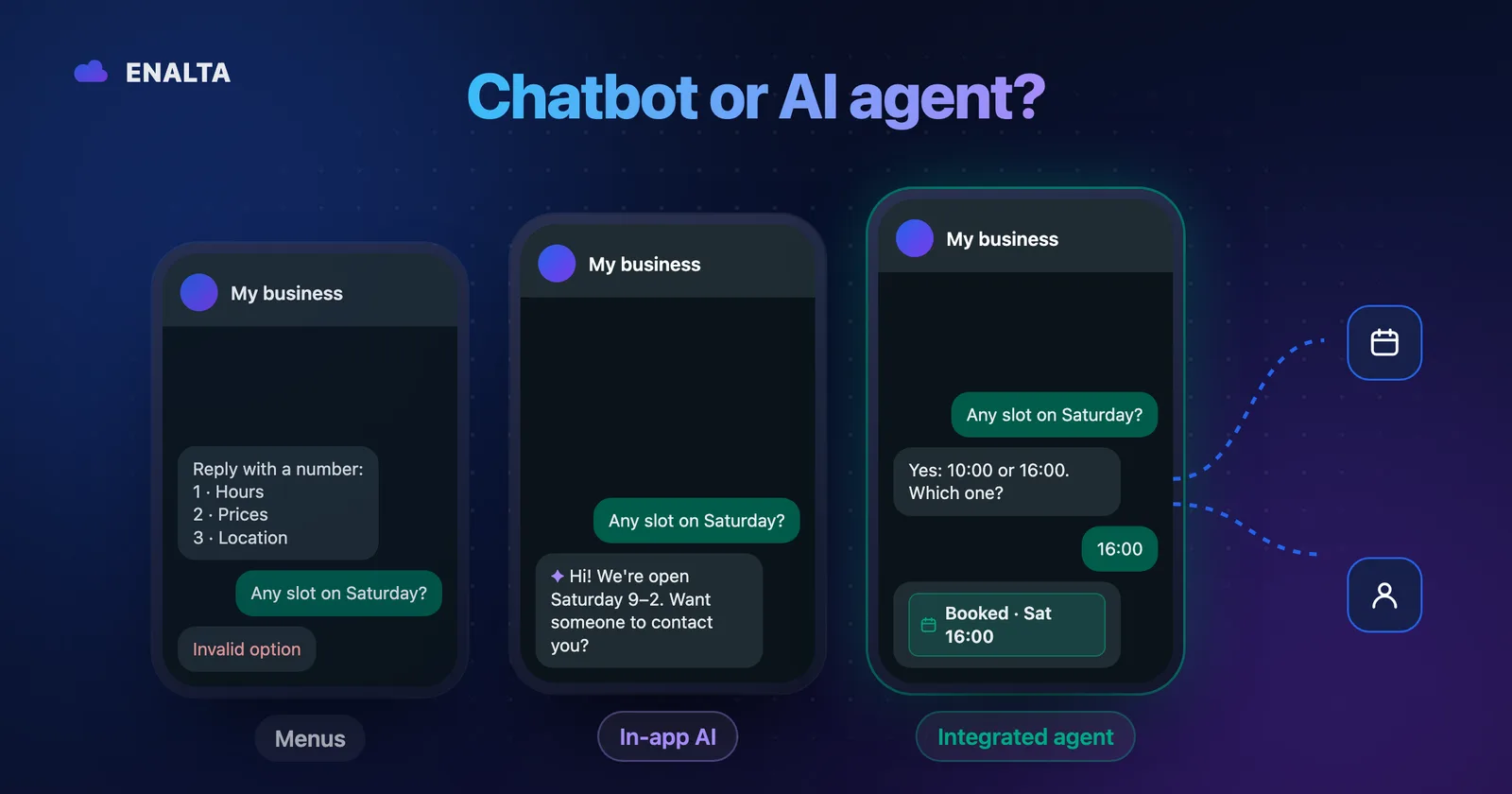
If you serve customers on WhatsApp, you've been pitched everything already: "chatbot," "AI bot," "virtual assistant," "agent." They all promise to answer for you, but a chatbot and a WhatsApp AI agent don't do the same thing, and they don't ask the same of your team.
The choice comes down to two things: whether your customers' questions are predictable and whether the system only has to answer or also has to do things, like booking an appointment or logging a lead. By the end you'll know which level your business is at and what the next step is, even if that step is buying nothing.
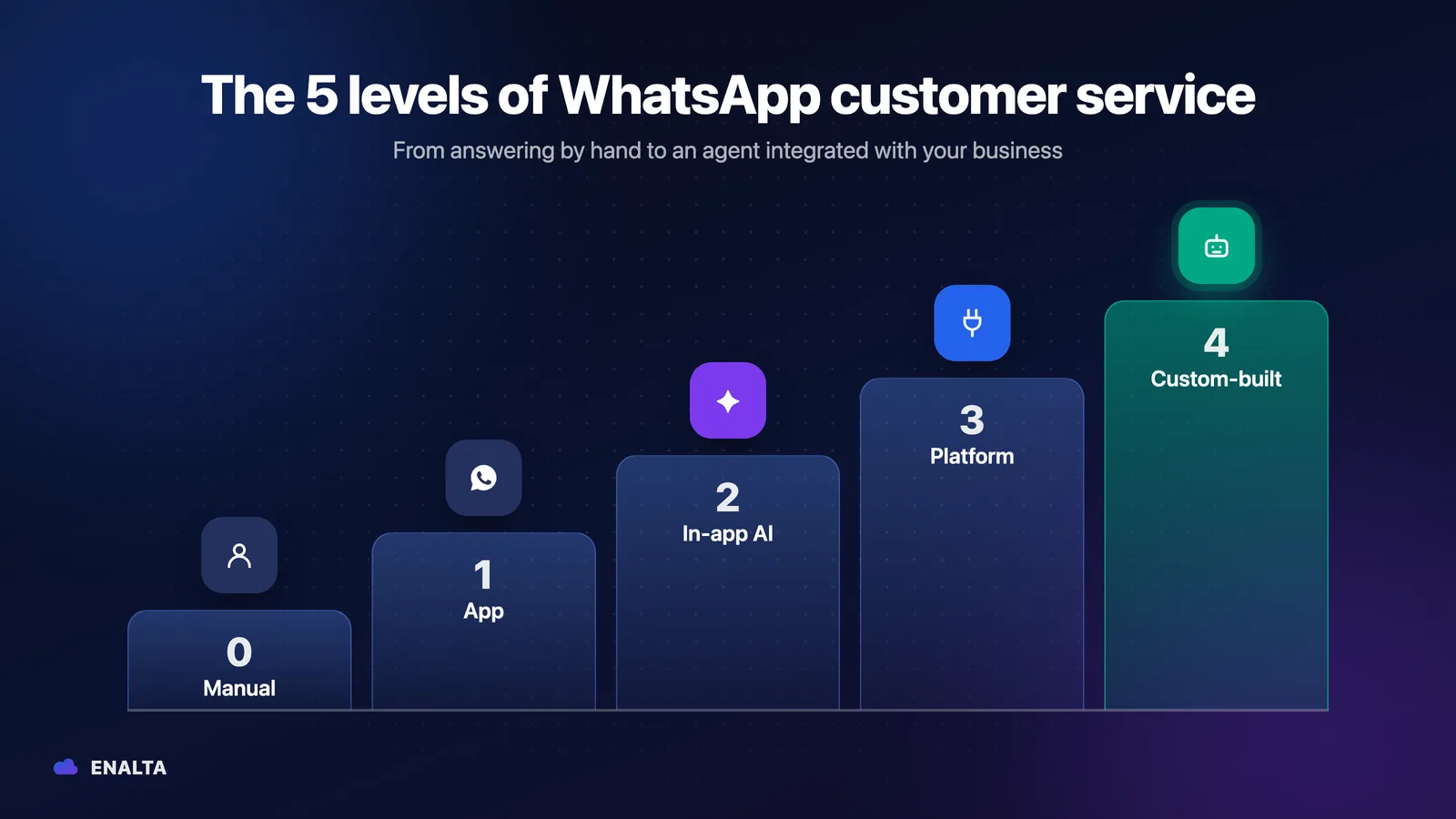
The short answer: five levels for automating WhatsApp Business
Each step up solves more, but takes more setup or more budget.
| Level | What it is | What it solves | Who sets it up | Effort from your team | Type of cost |
|---|---|---|---|---|---|
| 0. Manual | One person answers everything | Everything, as long as someone is there to answer | Nobody | High and constant | Your team's time |
| 1. App tools | Greeting, away messages, quick replies, labels and catalog | First contact and repeated answers | You, in the app | Medium: someone still answers | No additional cost |
| 2. AI built into the app | WhatsApp Business AI (Meta Business Agent) | FAQs using your information and catalog | You, in the app | Low to medium: review and correct | No published cost today (see below) |
| 3. API + platform or CRM with bot | Self-service software on top of the official API | Flows, shared inbox, campaigns, bots you build | Your team or a consultant | Medium to high: learn and run the tool | Subscription + message usage |
| 4. API + custom agent | AI agent designed for your business, with integrations | Open-ended conversations and actions in your systems | The provider who designs it | Low: review, approve and supervise | Implementation + maintenance + usage |
You don't need to reach level 4. You need to reach the level your message volume and your processes call for.
The difference between a chatbot and an AI agent, plainly
Rules-based or menu bot
It follows a script: "Type 1 for hours, 2 for prices." It's predictable and cheap to run. It gets stuck when the customer goes off script.
AI agent
It understands the question even when it's worded differently or when one message holds two questions. It answers with information your business has approved and, if it's connected to your systems, takes action: it finds an open time slot, logs the lead in your CRM or hands the conversation to a person along with the context.
What neither one should do
Make up prices or promise what you don't offer. And it needs to be said: AI can make mistakes. A good agent isn't one that never fails; it's one designed to limit errors and hand off to a person when it isn't sure.
WhatsApp Business AI in Mexico: the AI the app already includes
Mexico was the first country to get it. According to Expansión, it has been available since November 3, 2025; the requirements reported at launch were having the app in Spanish and at least one product in the catalog. You turn it on under Tools and, according to Xataka México, if the option doesn't show up you have to join a waitlist.
On June 3, 2026, Meta launched it globally as Meta Business Agent, according to TechCrunch. On pricing: today you turn it on from the app with no cost published by Meta, and Meta has said it plans to include it in some WhatsApp Business Premium tiers.
What it does well: it answers FAQs using your catalog and hours, recommends products, and you decide when it hands off to a person. For a simple catalog, that may be enough.
Where it falls short: according to TechCrunch, at the global launch, calendar management and agents connected to company systems were still in development.
| What your business needs | Business AI (app) | Custom agent (API) |
|---|---|---|
| Answer FAQs using your catalog | Yes | Yes |
| Book and reschedule in your real calendar | In development at launch | Yes, with calendar integration |
| Look up your CRM, inventory or appointment system | In development at launch | Yes, via API |
| Fine-grained rules (in health care: no diagnosing, no prescribing) | Limited to what the settings allow | Custom-designed |
| Multiple locations with different hours and prices | Depends on your catalog | Yes, with rules per location |
15-minute test: 10 questions for your Business AI
Ask someone to message it from another number:
- A price for something that isn't in your catalog.
- "Can you move my Thursday appointment to Friday?"
- Something ambiguous: "How much was that thing from last time?"
- Two questions in the same message.
- A complaint: "I was overcharged."
- An emergency: "It really hurts, what do I do?"
- After hours: "Do you have an opening early tomorrow?"
- A discount that doesn't exist: "Can I get it for half price?"
- A location or a service you no longer offer.
- "I want to talk to a person."
If it handles almost all of them well, you may not need more for now. If it fails on scheduling, data from another system or sensitive topics, you now know what the next level would have to solve.
Illustrative example: the same question, three answers
Illustrative example. A patient messages a dental office on a Friday night:
Patient: Do you have anything Saturday afternoon for a cleaning? How much is it?
a) Menu bot
Bot: Hi. Type 1 for hours, 2 for services, 3 for location. Patient: Cleaning Saturday Bot: Invalid option. Type 1, 2 or 3.
b) AI without integration
AI: Hi. A dental cleaning costs $X and we're open Saturdays from 10:00 to 18:00. As soon as we open, the team will confirm availability.
It answered well, but the patient still has no appointment and on Monday someone has to pick it back up.
c) Agent connected to the calendar
Agent: Hi. A dental cleaning costs $X. This Saturday I have 15:00 or 16:00 open. Which works for you? Patient: 16:00 Agent: Done, your appointment is set for Saturday at 16:00. I'll send you a reminder the day before. If you need to change it, message me here.
The appointment is already in the calendar, and the front desk can see it without opening the chat.
WhatsApp Business chatbot, app AI, self-service or custom agent: comparison table
| Criterion | Flow chatbot | App AI (Business AI) | Self-service platform or CRM with bot | Custom agent |
|---|---|---|---|---|
| How it understands the customer | Options and keywords | Natural language | Flows and, in some cases, AI you configure | Natural language, with your business rules |
| Actions in other systems | Few or none | Limited to the app | Whatever you connect | Whatever is designed (calendar, CRM, ERP) |
| Control over what it says | Total: it's a script | Whatever the settings allow | Depends on how you build it | Approved information and written rules |
| Handoff to a person | Menu option | Yes, you decide when | Yes, with a shared inbox | Yes, with context; your team can step in |
| Upfront cost | Low | No published cost today | Low (subscription) plus your time | Implementation |
| Recurring cost | Low | To be determined (Premium plans announced) | Subscription + messages | Maintenance + message and AI usage |
| Who maintains it | You | You | You or a consultant | The provider, with your approval |
| Risk of wrong answers | Low, but it gets stuck | Medium: review your information | Depends on your setup | Medium, controlled with rules, testing and supervision |
Level 3 includes platforms like Wati, ManyChat, respond.io, Cliengo or Botmaker, and CRMs with bots like Leadsales or Kommo. They're good tools if you have someone to run them. If you don't, see how a custom WhatsApp AI agent works.
About the API (levels 3 and 4): Meta charges per delivered message based on its category (marketing, utility, authentication or service), and messages the customer sends you are free. Check the current rate table on Meta's official page.
When a WhatsApp Business chatbot (or the app) is enough
If you get few questions, almost always the same ones, you don't book appointments in a system and the volume fits into one person's day, start with level 1 or 2.
Three away messages to adapt today (illustrative examples):
- Medical practice: "Thanks for writing. We're open Monday to Friday from 9:00 to 19:00 and will reply when we open. If this is a medical emergency, call 911."
- Spa: "Thanks for messaging us. Tomorrow from 10:00 we'll help you book your appointment. In the meantime, check our services and prices in the catalog."
- Auto repair shop: "We're open Monday to Saturday from 8:00 to 18:00. Leave us your car's make, model and year and what's wrong with it; we'll get back to you first thing."
When a WhatsApp AI agent is worth it
- The same question comes in many forms and quick replies aren't enough.
- You have appointments to book or reschedule and it eats up front-desk hours.
- Leads go cold because nobody follows up in time.
- The information lives in another system: CRM, calendar or inventory.
- Lots of messages arrive after hours.
- Several people answer the same number and conversations get lost.
If several of these sound familiar, run the numbers with your own figures.
Can you connect ChatGPT to WhatsApp Business?
Since January 15, 2026, the WhatsApp Business Platform terms don't allow it to be used when a general-purpose AI assistant is what's being offered, according to TechCrunch. Meta clarified that businesses using AI to serve their own customers, for example in support or sales, are not affected.
Bottom line: your agent must be scoped to your business. And connecting it yourself takes engineering, rules, testing and supervision, not just following a tutorial.
How to decide what your business needs: 6 questions
- Do your customers almost always ask the same things?
- Do you need to book in a real calendar, not just "take a message"?
- Do you use a CRM, an inventory or an appointment system?
- Are there sensitive topics, like health or payments?
- How many messages do you get per month? If you don't know, count them for a week and multiply by four.
- Who's going to maintain it: someone on your team or a provider? If it's a provider, see how to evaluate whoever builds it for you.
| If your situation is... | Suggested level |
|---|---|
| Repeated questions, no scheduling or systems, low volume | 1: app tools |
| Varied questions about your catalog, no scheduling or integrations | 2: Business AI |
| High volume, clear flows and someone to run the tool | 3: self-service platform or CRM with bot |
| Real scheduling, CRM or inventory, sensitive topics or nobody to run it | 4: custom agent |
Frequently asked questions
What is a WhatsApp AI agent?
It's a system that talks with your customers in natural language, understands the question even when it's worded differently and answers with information your business has approved. Connected to your systems, it also carries out tasks: it books appointments in your calendar, logs leads in your CRM or hands the conversation to a person along with the context.
Can a chatbot book appointments?
It can collect the appointment details, but to actually book, it needs a connection to your real calendar. Without it, the chatbot only takes a message and someone on your team confirms later. A connected agent checks availability, offers open slots and records the appointment without the front desk opening the chat.
Can I connect ChatGPT to WhatsApp Business?
Not as a general-purpose assistant: since January 15, 2026, the WhatsApp Business Platform terms don't allow it. You can use AI to serve your own customers in support, sales or appointments, with an agent scoped to your business, rules, testing and supervision.
Can AI make mistakes?
Yes. That's why a well-designed agent runs on approved information, written rules, testing before going live and a handoff to a person when it isn't sure. Your team should be able to step into any conversation. The goal isn't for it to never fail, but to limit errors and fix them in time.
Can I start with the app and move up a level later?
Yes, and it's a good way to learn what your customers ask before you invest. Start with the app tools or with Business AI and count your messages for a week. If you later move to the API, connecting your current number is reviewed case by case.
If you'd rather have it designed for you
If you're at level 4 and don't have anyone to run a platform, at ENALTA we design, integrate and maintain AI agents on the official WhatsApp Business Platform. It's a custom-built service, not a do-it-yourself tool.
The process: Diagnosis → Design → Integration and testing → Launch and optimization. The agent answers with information you approve, books in your calendar, logs leads and transfers to a person. Your team can step in, and sensitive actions stay restricted.
Implementation is $1,890 USD + VAT (one-time card payment) and the agent goes live in 10 business days. Maintenance starts at $390 USD + VAT/month, isn't charged until the agent is live, and includes WhatsApp (Meta) and AI usage up to 1,000 conversations a month.
Before you decide, see how an agent answers and books in the demo. If you'd like us to review your case, write to us to assess your WhatsApp automation.
Sources
- Expansión: Mexico is the first country to get AI agents in WhatsApp Business (Oct 16, 2025)
- Xataka México: turning on the AI assistants in WhatsApp Business and the waitlist (Oct 17, 2025)
- TechCrunch: Meta's AI agent for WhatsApp Business is now available globally (Jun 3, 2026)
- TechCrunch: WhatsApp changes its terms to bar general-purpose chatbots from its platform (Oct 18, 2025; in effect since Jan 15, 2026)
- Meta for Developers: WhatsApp Business Platform pricing
- WhatsApp: WhatsApp Help Center